Tuesday, March 17, 2020

High School Assignments - Starting & Completing


This post started in the dentist's chair!  My hygienist, Nancy, has been trying to help her son (who has an IEP for ADHD) complete his Grade 10 assignments.  It's a measure of the positive relationship that Nancy and her son have that he accepts her help, but Nancy was concerned that they were spending far too much time on the assignments.  She was also frustrated that neither of them were entirely sure that they were going in the right direction.

Children with (Executive Function deficits and) ADHD have a hard time getting started — and following through — on assignments because they have difficulty picking topics, locating appropriate resources, holding and manipulating information in their memory, organizing and sequencing the material, and getting it down on paper — all before they forget what they wanted to say.

               So with the help of additudemag.com and understood.org here are some ideas.

Please keep in mind that if you're supporting your child with his assignments, you are part of the process of helping students learn to do these assignments on their own .  It is not about parents 'doing' the assignment, but rather helping students gain the tools and strategies so that they can be independent learners.  Often, parents have to be their child's 'Executive Functions' until the child has acquired the relevant tools and strategies.  


This process is called scaffolding  because supports are put in place to help the student learn how to achieve her own learning goals.  For instance, "graphic organizers, pictures, and charts can all serve as scaffolding tools.  Graphic organizers ... help kids visually represent their ideas, organize information, and grasp concepts such as sequencing and cause and effect."

Check my first post Smart but Scattered. Check out the edition for teens.  Lots of good ideas to help with assignments.

I have divided the rest of this post into two sections.  The first is for the student,  the second for the parent.  I hope that that works for you both.

PART 1 - STUDENT


Getting Started

  1. Technology
  2. Teacher
  3. Buddies
  4. Calendars
  5. BROIL

1. Technology

  • Use technology to help you know what is required.
    • Take a photo of the posted assignment on your phone.
    • Record your understanding of the assignment as soon as you can, either verbally or on paper (text or diagrams).

2. Teacher

  • Ask your teacher for exemplars of what a similar completed assignment looks like.
    • Take photos to help you remember.
  • Ask your teacher for recommendations for succeeding on the assignment.
    • Ask for an explanation of anything you are not sure of.  
    • Go over the rubric to make sure you know how you will be assessed.
    • Know what's in your IEP and talk to your teachers about modifying assignments to ensure your success. This is not easy.  Work with your parents to practise!

3. Buddies

  • Find a buddy in class who is open to you phoning or texting to get clarification about the assignment.

4. Calendars

  • Use calendars (monthly, weekly) to keep track of assignment deadlines
    • Sync these with your parents' calendars 

5. BROIL 

 Nope, it's not a cooking method.  It's a mnemonic.  Use it as a guideline to know what to include in your notes before you start:
  • B - anything the teacher writes on the BOARD
  • R - anything the teacher REPEATS
  • O - anything the teachers says will ON THE TEST
  • I - anything the teacher says is IMPORTANT
  • L - anything that is in a LIST


    Completing the Assignment

    There are a variety of tools and strategies listed below.  It is not a 'one size fits all' game.  Pick and choose depending on your learning style, your comfort level. Even mix and match.  


    1. Technology
    2. Soft Technology
    3. Parents 
    4. Graphic Organizers

    1. Technology

    • Use voice to text programs/apps to help you expand on what you heard in class or what you have researched.
    • Or just dictate what you are thinking about and then play it back to see if your own thoughts generate more ideas.
    • Use the photos you took of the assignment, the notes, the deadlines. Print them if necessary.

    2. Soft Technology

    • Use erasable highlighters in textbooks to note key points.
    • Use sticky notes to keep track of main points as you research (there are big sticky notes out there).
      • Group the notes together to keep track of similar points.
      • If you're a 'moving' (kinesthetic) learner - post the notes around the room, or down the hall so that you can pace and physically move them around to see where they fit best.
    • Use a big whiteboard or a large piece of paper up on the wall (painters' tape keeps it there and doesn't ruin the paint) to record your ideas

    3. Parents

    • Use your parents as scribes; dictate your thinking and then have them type it up so that you can edit and organize on the computer.
    • Get their help in setting up the monthly and weekly calendars to keep track of dates.

    4. Graphic Organizers  

    Remember the 'Hamburger Paragraph' from elementary school.  That was a graphic organizer!

    • Use graphic organizers to help you organize your thoughts.  Here's a link to some great organizers that you might have used before.  
    • Start with three (3) pieces of paper or documents on the computer:
      • What I know already
      • What I need to know
      • Where I can find out what I need to know
    • If visuals work for you, use drawings to generate ideas (Remember that a picture is worth a 1000 words!)

    PART 2 - PARENTS

    Helping Students Get Started

    I want to keep this specific to the topic of completing assignments.  There are ideas throughout my posts to help with the organization of work.  I've also suggested to students that they reach out to their teachers.  For any student that can be intimidating (shouldn't be but often is); for students who learn differently it can be a game changer.  

    Spending time boosting your child's confidence in self-advocacy is key.  (Self -Advocacy is defined as the ability to speak on one's behalf and represent personal needs and interests.) Role-playing before hand (you're the teacher, your child is the student and you practise what to say; reverse - you're the student; child is the teacher; how does that go?).  Nancy's son went to school with cue cards to help him talk to his teachers.  Here's a graphic from the Ontario Federation of Teachers website.


    From OTF (Ontario Teachers' Federation)

    • Be in regular touch with teachers, including Special Education teachers and support staff.  Use the school staff directory to find all those working with those who learn differently.
    • Stay up-to-date with your child's IEP and specific modifications, recommendations, and/or accommodations that apply to assignments.
      • Be prepared to help teachers understand your expectations from the IEP.
    • Know where to find the links for the assignment (e.g., Google Classroom).
      •  Look for specific instructions, rubrics, exemplars (sample work that will help illustrate expectations of leveled work).
    • Ask for specific deadlines, hopefully broken down into manageable segments.

    Helping Students Complete Assignments

    • Keep track of the amount of time spent on the assignment.  
    • Ask teachers for a guideline of how much time is expected to complete this assignment.
    • If it's taking 3 hours per night for what should really be 30 minutes per night, does the assignment need to be modified? 
      • Check to see if your child needs reinforcement to stay on task, especially with the content itself.
    • Stay on top of the assignment's deadlines, using the monthly and weekly calendars. 
    • Be ready to be a scribe.  And only a scribe, hard as that might be.  The scaffolding strategy would include asking these questions:
      • What do you think of...?
      • Have you thought of....?
      • What would happen if.....?
      • Can you try.....?
    • Work with your child to set up incentives for reaching specific deadlines and/or achievements.
    • Celebrate those small steps and successes.

    Finally 

    As you (both) get closer to the deadline, you may feel like the paper isn’t good enough. Don’t go there. If you have followed all of the steps above and have committed to the project from the start, the paper may be better than you think it is. Don’t let the perfect be the enemy of the good. Do your best to tidy up what you have produced, and turn it in.

          And finally, finally - stay well, stay safe, and stay home!  

    Friday, March 13, 2020

    Starting and Completing High School Assignments v2

    If you have been directed to this post, please see this post instead. It bothered me that the formatting did not work in the post below.  So I reworked it and as I did so I tightened up some of the text.  My apologies but you will be directed to a better version!
    This post started in the dentist's chair!  My hygienist, Nancy, has been trying to help her son (who has an IEP for ADHD) complete his Grade 10 assignments.  It's a measure of the positive relationship that Nancy and her son have that he accepts her help, but Nancy was concerned that they were spending far too much time on the assignments.  She was also frustrated that neither of them were entirely sure that they were going in the right direction.

    Children with (Executive Function deficits and) ADHD have a hard time getting started — and following through — on assignments because they have difficulty picking topics, locating appropriate resources, holding and manipulating information in their memory, organizing and sequencing the material, and getting it down on paper — all before they forget what they wanted to say.

    So with the help of additudemag.com and understood.org here are some ideas.

    Please keep in mind that if you're supporting your child with his assignments, you are part of the process of helping students learn to do these assignments on their own .  It is not about parents 'doing' the assignment, but rather helping students gain the tools and strategies so that they can be independent learners.  Often, parents have to be their child's 'Executive Functions' until the child has acquired the relevant tools and strategies.  


    This process is called scaffolding   because supports are put in place to help the student learn how to achieve her own learning goals.  For instance, "graphic organizers, pictures, and charts can all serve as scaffolding tools.  Graphic organizers ... help kids visually represent their ideas, organize information, and grasp concepts such as sequencing and cause and effect."

    Check my very first post Smart but Scattered. Check out the edition for teens.  Lots of good ideas to help with assignments.

    I have divided the rest of this post into two sections.  The first is for the student,  the second for the parent.  I hope that that works for you both.

    Getting Started

    1. Technology
    2. Teacher
    3. Buddies
    4. Calendars
    5. BROIL

    1. Technology

    • Use technology to help you know what is required.
      • Take a photo of the posted assignment on your phone.
      • Record your understanding of the assignment as soon as you can, either verbally or on paper (text or diagrams).

    2. Teacher

    • Ask your teacher for exemplars of what a similar completed assignment looks like.
      • Take photos to help you remember.
    • Ask your teacher for recommendations for succeeding on the assignment.
      • Ask for an explanation of anything you are not sure of.  
      • Go over the rubric to make sure you know how you will be assessed.
      • Know what's in your IEP and talk to your teachers about modifying assignments to ensure your success. This is not easy.  Work with your parents to practise!

    3. Buddies

    • Find a buddy in class who is open to you phoning or texting to get clarification about the assignment.

    4. Calendars

    • Use calendars (monthly, weekly) to keep track of assignment deadlines
      • Sync these with your parents' calendars 

    5. BROIL 

     Nope, it's not a cooking method.  It's a mnemonic.  Use it as a guideline to know what to include in your notes before you start:
    • B - anything the teacher writes on the BOARD
    • R - anything the teacher REPEATS
    • O - anything the teachers says will ON THE TEST
    • I - anything the teacher says is IMPORTANT
    • L - anything that is in a LIST


      Completing the Assignment

      There are a variety of tools and strategies listed below.  It is not a 'one size fits all' game.  Pick and choose depending on your learning style, your comfort level. Even mix and match.  


      1. Technology
      2. Soft Technology
      3. Parents 
      4. Graphic Organizers

      1. Technology

      • Use voice to text programs/apps to help you expand on what you heard in class or what you have researched.
      • Or just dictate what you are thinking about and then play it back to see if your own thoughts generate more ideas.
      • Use the photos you took of the assignment, the notes, the deadlines. Print them if necessary.

      2. Soft Technology

      • Use erasable highlighters in textbooks to note key points.
      • Use sticky notes to keep track of main points as you research (there are big sticky notes out there).
        • Group the notes together to keep track of similar points.
        • If you're a 'moving' (kinesthetic) learner - post the notes around the room, or down the hall so that you can pace and physically move them around to see where they fit best.
      • Use a big whiteboard or a large piece of paper up on the wall (painters' tape keeps it there and doesn't ruin the paint) to record your ideas

      3. Parents

      • Use your parents as scribes; dictate your thinking and then have them type it up so that you can edit and organize on the computer.
      • Get their help in setting up the monthly and weekly calendars to keep track of dates.

      4. Graphic Organizers  

      Remember the 'Hamburger Paragraph' from elementary school.  That was a graphic organizer!

      • Use graphic organizers to help you organize your thoughts.  Here's a link to some great organizers that you might have used before.  
      • Start with three (3) pieces of paper or documents on the computer:
        • What I know already
        • What I need to know
        • Where I can find out what I need to know
      • If visuals work for you, use drawings to generate ideas (Remember that a picture is worth a 1000 words!)

      Parents Helping Students Get Started

      I want to keep this specific to the topic of completing assignments.  There are ideas throughout my posts to help with the organization of work.  I've also suggested to students that they reach out to their teachers.  For any student that can be intimidating (shouldn't be but often is); for students who learn differently it can be a game changer.  

      Spending time boosting your child's confidence in self-advocacy is key.  (Self -Advocacy is defined as the ability to speak on one's behalf and represent personal needs and interests.) Role-playing before hand (you're the teacher, your child is the student and you practise what to say; reverse - you're the student; child is the teacher; how does that go?).  Nancy's son went to school with cue cards to help him talk to his teachers.  Here's a graphic from the Ontario Federation of Teachers website.


      From OTF (Ontario Teachers' Federation)

      • Be in regular touch with teachers, including Special Education teachers and support staff. Use the school staff directory to find all those involved with those who learn differently.
      • Stay up-to-date with your child's IEP and specific modifications/accommodations that apply to the assignment.
        • Be prepared to help teachers understand your expectations from that IEP.
      • Know where to find the links for the assignments (e.g., Google Classroom).
        • Look for specific instructions, rubrics, exemplars.
      • Ask for specific deadlines, hopefully broken down into manageable segments.

      Parents Helping Students Complete Assignments


      • Keep track of the amount of time spent on the assignment.
      • Ask teachers for a guideline of how much time would be expected to complete the assignment. 
      • If it's taking 3 hours for what should really be 30 minutes per night, does the assignment need to be modified? (Check to see if your child needs reinforcement to stay on task.  I used to remind my students that the majority of the work was to be on content; the cover page and making the assignment beautiful should be done last and in the least amount of time). 
      • Be aware of lagging enthusiasm (i.e. limit the amount of time spent at any one time).  
        • Break the time spent on the assignment into shorter periods and come back refreshed.
        • Suggest a walk outside or some physical exercise to remove the cobwebs.
      • Stay on top of the assignment's deadlines, using the monthly and weekly calendars. 
        • Move the 'clock' forward toward the approaching deadline (not to create a sense of panic but to show - in 'real time' - that there is a sense of urgency).
      • Be ready to be a scribe
        • And only a scribe, hard as that is (which doesn't mean you can't make suggestions.  Try
          •  'What do you think of...'; 
          • 'Have you thought of....'; 
          • What would happen if you .....'; 
          • 'Can you try.....?'
      • Work with your child to set up incentives and rewards for reaching specific deadlines and/or achievements.
      • Celebrate the small steps and successes.


      Finally 

      As you (both) get closer to the deadline, you may feel like the paper isn’t good enough. Don’t go there. If you have followed all of the steps above and have committed to the project from the start, the paper may be better than you think it is. Don’t let the perfect be the enemy of the good. Do your best to tidy up what you have produced, and turn it in.
      Personal comment: I have spent a lot of time on this post.  I was so disappointed when I previewed it and saw that the formatting was not as it looked when I 'wrote' it.  I spent a lot of time trying to figure out what I should do (and might still go back and do that).  But then I thought I should take my own advice.  I would like it to look perfect but the content is solid.  And so I will not let 'the perfect' be the 'enemy of the good'.  

      But if any of you know how to make it look 'better' I'd be most appreciative!

      And finally, finally - stay well, stay safe, and stay home! 

      Tuesday, February 18, 2020

      Metric Staircase and Math Antics

      This is a short post today with two hints/strategies/homework help related to Math (and apologies for those who know about these already!)

      The first is from my Grade 7 student, Emma.  She told me with a lot of pride that she had done well on her measurement test today and one of the strategies that really helped her was the Metric Staircase.  So we checked it out - with Emma explaining to me how it worked and the mnemonic for remembering the intervals.  I've put three examples here; in the first one I circled the unit that is not used often (although you'll see it in 'hectares' - a unit of area)


      Emma added that her chart had another arrow indicating that you multiply when moving down the staircase.  You could create a separate staircase depending on the units being worked on (mass, distance, capacity).  


      The other Math help I learned as I was editing the Math textbooks I'm working on for GTK Press.  It's a video series called Math Antics.  I've been impressed with the professional presentation of all the videos. The pace is fast enough to keep  you interested; the graphics are well done; and there is humour. Check out the one Emma and I watched today on Integers.  For others - do a search on Math Antics + topic.  Be careful - there are some really sloppy videos out there.  I've spent a lot of time looking at potential videos and this series is by far the best.


      Stay safe and warm.

      Gerrie

      Tuesday, February 4, 2020

      Developmental Coordinator Disorder

      It's been a bleak start to this month in terms of no sunshine, although I hear some is promised for tomorrow.  Bleak in other ways too, as I look back on my previous post and the reference to the strife in Ontario's education system.  Don't we all wish that would resolve soon with all sides feeling good.

      Let's carry on with the Fact Sheets I started earlier.  So far we have discussed Dyslexia, ADHD, and Dyscalculia. Today it's Developmental Coordination Disorder.


      Some children may experience difficulties in a variety of areas while others may have problems only with specific activities.
      DCD is a lack of coordination between your mental intentions and your ability to get your body to carry out those intentions. For example, you might think, “I need to tie my shoe.” However, your brain does not properly send the instructions for shoe tying to your hands and feet. Your brain knows how to tie shoes, but your hands just can’t follow your brain’s instructions. 
      Testing for DCD can be done by professionals such as pediatricians, while others such as physical and occupational therapists, as well as educational evaluators, can test but cannot make an official diagnosis.  The evaluator will compare the child's abilities with those of other children the same age.
      There are five core areas that are assessed.  Briefly (because the full article is here), they are:
      1. Strength 
      2. Balance
      3. Coordination
      4. Visuomotor Skills
      5. Fine Motor and Graphomotor Skills
      Medication is not prescribed for DCD but there are therapies to help develop motor skills.  Different specialists work on different aspects of the disorder.  Occupational therapists focus on coordination; physical therapists work on muscle strength.

      Support in school might include:
      • text to speech software
      • touchscreens
      • keyboards
      • paper with wide, coloured, or raised lines
      Check here for more ideas about school accommodations. One of the suggestions that makes sense for all students is to ensure that the chair and/or desk height is appropriate so the child can sit with his feet on the floor, shoulders relaxed, and forearms supported on the desk.  But another suggestion is to allow the child to work in other positions, including standing. 

      And I like this one - if using a computer isn't an option - use different writing instruments (such as thin markers or gel pens) which help to reduce the pressure when using a pencil.  I tell my students that the only people allowed to have white knuckles are pilots!  I should be able to take a pencil/pen from their grasp.

      Here's a wonderful page to for multisensory handwriting techniques.  Some key ideas (and these are NOT limited to kids with DCD):

      • Use dark-ruled and 'bumpy' paper.  Here's a template. The bold lines top and bottom with a dotted line in the middle help the child see barriers and keep the letters from drifting around.
      • Trace and do mazes help develop fine motor control and help him learn how to orient her movements from left to right, top to bottom.  The mazes help him stay within a designated space.  
      • Santa gave me an LCD Boogie Board for Christmas;  it's a full-size board and comes with templates.  It's ideal because the writing doesn't smudge so lefties have no problem. I could easily put the dark ruled paper under it, but I could also make those modifications on the template that comes with the Board. There are kid-sized versions that are fun and useful too.
      • A Space Buddy or Space Kid helps those kids who have trouble with the spaces between words and letters. One version (Space Buddy) is to glue a brightly coloured button atop a colourful craft stick.  The stick placed sideways goes between letters; the button between words.  The Space Kid is a little simpler.


      Finally, here's an activity I haven't seen in the discussion about DCD, but I think is most appropriate.  It's called the Spider Web Maze - it's a homemade indoor maze that kids can climb in, on, around, and through. It uses fine motor skills and visual motor planning, plus hand-eye coordination, and it turns your living room into an awesome spider web using the furniture and a lot of yarn! The photo is worth a 1000 words!
      • Moving over, under, and around requires gross motor skills and motor planning to plan out, organize, and carry out an action.  Adding a ring and moving it along the yarn adds another developmental skill. The child has to scan where the ring will go next and manage her hands to work the ring along the yarn. She has to hold the yarn with one hand and string the ring along with the other, all while moving under and over the string below and under her.
      Daniel Radcliffe (he of Harry Potter fame) has stated that he has been diagnosed with DCD.
      He claims that primary school was really hard for him because he felt he was awful at
      everything but it is obvious that he overcame that!


      Saturday, January 18, 2020

      Dyscalculia

      As I write this post, the wind and snow are swirling around the house, education in Ontario is in a state of unrest, Newfoundland/Labrador has been pounded by a storm of horrific magnitude, Canada is still negotiating with Iran, and Harry and Meghan have been 'unroyaled' or is it 'deroyaled'?  Those are made-up words for that news story that keeps our minds off the others.

      So how are you doing?  Ready to step back into the world of Fact Sheets about different ways of learning and thinking?  I'm going to tackle two this week (and the good thing about online publishing is that it allows me to go back and change this!)

      So here's the first one (I'm being pedantic by adding the Fact Sheets from understood.org as they appeared in the original email.  The six Fact sheets are: Dyslexia (last post); ADHD; Dyscalculia; Slow Processing Speed; Sensory Processing; and DCD.  I've linked all six in case you want to get ahead of me!

      ADHD


      I tackled this topic in several posts last year (!) so I won't spend any more time on it.  My biggest concern for children is summed up in the statement above: ADHD isn't caused by laziness or lack of discipline.  Too many children have been incorrectly and unfairly judged as lazy or undisciplined.  The other concern falls under the Ways to help  category - finding strategies for coping with anxiety.

      Dyscalculia


      Up to 7% of elementary school students have dyscalculia. Research suggests it's as common as dyslexia -- a reading disorder -- but not as well understood. In fact, kids and parents sometimes call it “math dyslexia,” but this can be confusing because dyscalculia is a completely different condition. Kids with dyscalculia may count on their fingers long after other children have stopped doing so.  

      How Can I Help My Child?

      The following suggestions are from the website linked above.  I've modified some of the ideas based on my experience.
         
      Here are some things you can try to help your child better learn and understand math and lower her anxiety:
      • Let her use her fingers and paper when she counts. My experience with students I suspect have dyscalculia is that their fingers move far faster than I can imagine. The problem with using fingers is that it eventually will not be as helpful when we're talking more difficult math problems.
      • Make sure she has the right tools, like an easy-to-use calculator and plenty of erasers. It is really important to get the teacher's buy-in for this.  It's also why it's important to have testing done to ensure that this is the appropriate diagnosis.  And once you have that, you can have an IEP that will - should - allow these accommodations. I'd add that having a multiplication chart close by is a real asset as well.  Have it laminated or put into a plastic sleeve and taped to your child's desk.  
      • Use graph paper. It helps keep columns and numbers straight and neat. This is really important and the bigger the grid the better because lots of children don't print small!  This link is to 1/2 inch grid. This is 1 cm grid paper, perhaps more useful.
      • Use rhythm and music to teach math facts and steps. I've worked with a student who had no problems with the algorithms (knowing how to add, multiply etc.) but could not remember the math facts.  In fact, I started learning about dyscalculia after entering a search quest for: "Can't remember number facts"  and up popped understood.org with information about dyscalculia.  
      • Get an experienced math tutor to help. I'm here!!
      • Draw pictures of math word problems. This is a really important strategy and it reminds me that I should do a post about the different problem solving strategies!
      • Schedule computer time to play math games. How's this - play x number of minutes on a math game/app to earn y number of minutes of another online game.  
      • Praise her hard work, not the outcome. 
      • Talk with her about her learning disability.
      • Teach her ways to manage anxiety.

      Some Math Game Apps

      1. Quick Math Jr is one of the best apps I've seen for younger kids (and kids struggling and needing confidence.)  There is a free version; I purchased the upgrade.  My students are most eager to play this game.  Little side story - a few years ago when travelling in Italy, John and I stepped outside our comfort zone and as part of a package to get to know more about Italy, we had dinner with a family in Florence.  The two young daughters did not have much English but I gave them my iPad and showed them the game.  Within minutes they were playing away.  Here's a link to a review.
      2. The big brother of Quick Math Jr is Quick Math.  It's a drill app for all four operations.  If your child is competitive this is a good game because it times how quickly you get through each set and then posts the score.  It is leveled, so you can choose both the operation (addition, subtraction, multiplication, and division) as well as Beginner and up.  I also like the fact that to answer the problems you have to 'write' with your finger directly on the screen so it encourages proper number formation.  Unfortunately I cannot find the app on Google Play, only iOS.  Beware - there are apps on Google Play called Quick Math but they are not from Shiny Things (the maker of Quick Math Jr and Quick Math).  

      3. Finally, there are so many apps out there.  Check out this page for reviews of Math apps on both iOS and Google Play.  I have downloaded only the Quick Math so far but intend to add more using these recommendations.  I'll keep you posted. Do not be put off by the reference to 4th Grade.  
      Just before we get to the January cartoons, here's a link from ADDitude magazine about Dyscalulia in Adults because it's not just for kids!

      Enjoy!


      Tuesday, January 7, 2020

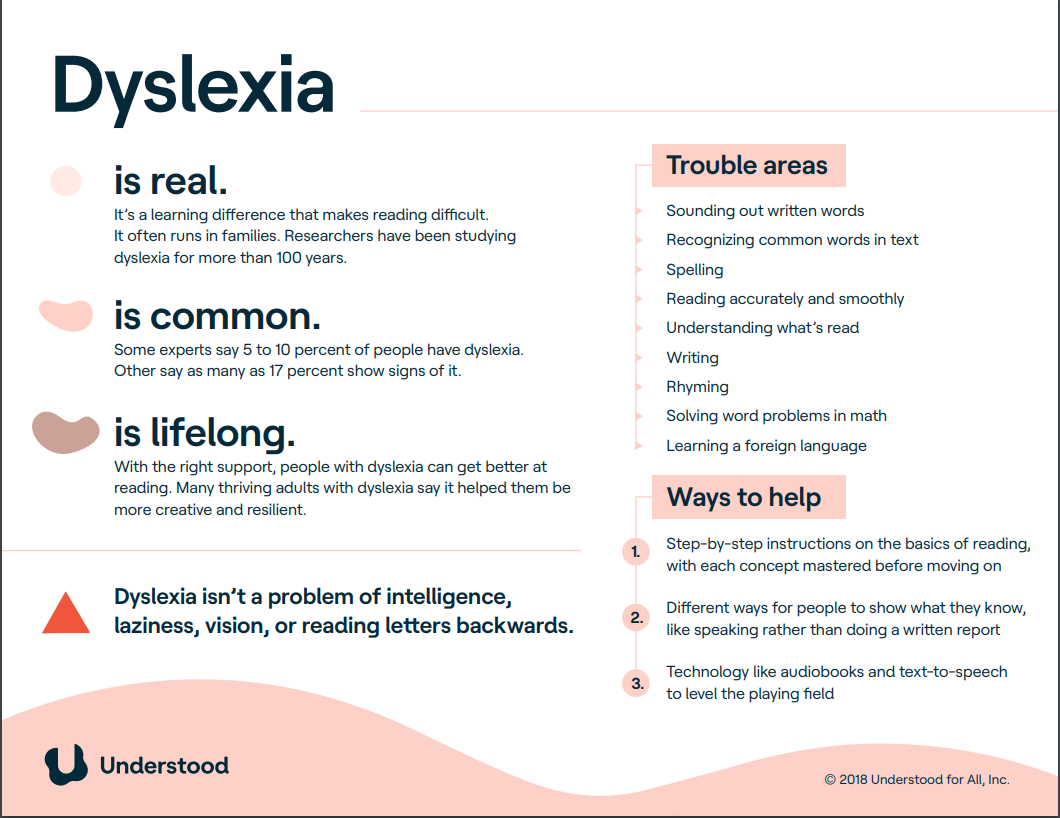
      Dyslexia Fact Sheet


      It's been a challenging start to a new decade but this is a Blog about keeping things positive and looking for ways to make things better for all our children.  Let's start the year with some fact sheets from understood.org that have basic information about various learning and thinking differences.  Share these posters with teachers, family members, and friends.  

      I was going to include all six fact sheets in one post but realized that that would be too overwhelming for all of us (writer and reader!).  So let's do just one each week.  

      I've included the link to the PDF for the fact sheet in the title of the section. Sidebar - I love it when I find a typo in these professionally produced illustrations.  Can you spot the typo in this first one?  (Corrine - you'll find it right away).

      DYSLEXIA


      Famous People with Dyslexia

      1. Jennifer Aniston - Aniston didn’t know she was dyslexic until she was in her 20s. She says finding out explained why it was so hard to read back in school and why she chose the role of class clown over teacher’s pet. The diagnosis answered a lot of questions. "I felt like all my childhood trauma-dies, tragedies, dramas, were explained."
      2. Steven Spielberg The movie mogul has had his own close encounter with dyslexia, though he didn’t know until he was 60 that he had the disorder. Bullied as a kid, he struggled through school and dropped out of college in 1968. Since then, the famed filmmaker has fought back using the big screen. The Goonies, a cult classic he co-wrote and produced, reflects Spielberg’s teen years as a self-proclaimed “nerd” and “outsider.”
      3. Whoopi Goldbergclass bullies called her “stupid.” The multi-talented Goldberg didn’t even find out she had dyslexia until well after she dropped out of school. 
      4. Henry WinklerBest known as “The Fonz” on Happy Days, this actor-turned-author was always one to improvise on the set. Winkler confesses his trouble reading was a big reason for going off-script. He says dyslexia also taught him kindness. You can see that when he talks about Hank Zipzer, “world’s greatest underachiever” and the main character in the children’s books he’s written about dyslexia.
      5. Richard BransonThe head of his high school predicted this British entrepreneur would end up in prison or become a millionaire. Try billionaire, with a “b,” many times over. Branson says dyslexia and what he describes as “a different way of thinking” have helped him succeed. Branson stars in a 2012 movie called The Big Picture: Rethinking Dyslexia
      6. Jay LenoThe comedian and former host of The Tonight Show says there wasn’t really a name for dyslexia when he was in high school -- everyone just told him to smarten up. It all turned around when a creative writing teacher suggested he put some of the funny stories he was always telling on paper. “That was the first time in my life I really focused on something.”
      7. Danny Glover  didn’t get the acting bug until his late 20s, and he didn’t know he was dyslexic until he was 30. Not having a diagnosis back then he felt “unworthy to learn.” But Glover found an escape in acting, which, he says, “gave me a way of expressing some of that inner life that was raging inside of me.”
      8. Kiera KnightleyDyslexia was both the carrot and the stick for this British-born Academy Award nominee. Getting good grades earned her time on stage, so she was eager to please. Behind the scenes, though, some classmates were just as eager to tease. “It’s amazing what a child calling you stupid would do to make you read pretty quickly,” Knightley recalls. She says dyslexia has made her the actress she is today.
      Dyslexia was not well understood until the late 20th century. Even today it can be hard for doctors to diagnose. Given what we know now, many famous people may have had dyslexia, including Leonardo da Vinci, Saint Teresa, Napoleon, Winston Churchill, Carl Jung, Albert Einstein, and Thomas Edison.

      As I read the mini-bios of the eight personalities I was saddened by the similarity of their stories - feeling less than positive about themselves, being bullied, not knowing about dyslexia until later in life, and the feeling of relief once they did know.  It's so important to follow up on your instincts if you suspect a child you know and love might be having trouble because of this learning difference.  


      Finally, sometimes identifying with a character in a book can be helpful.  Check out these books that feature characters with dyslexia or ADHD.

      Understood.org has over 525 links to searches about dyslexia on its website.  If you're having trouble filtering where to start, what to read, send me an email (gerriestorr@rogers.com) and I'll try to help.  

      And really finally - this cartoon doesn't get it; dyslexia is not about reading words backwards.